Your Google Business Profile is suspended. Many businesses experience suspensions and the resulting loss of visibility. Your calls have stopped. Your Maps listing is gone. Let’s talk about what to do right now.
First, identify your suspension type. Hard suspensions pull your listing from Maps entirely. Soft suspensions leave it visible, but freeze your ability to manage it. The fix is different for each, and choosing the wrong path burns one of your two appeal attempts. Acting quickly is crucial to keep your business visible on Google Search and Maps.
At SEOptimize, the first thing we do when a client’s profile goes down is audit the root cause before anyone touches the appeals tool. Filing too fast is the single most common and most expensive mistake we see.
This guide covers every step:
- How to identify your suspension type
- What actually triggered it
- How to build and file a clean appeal
- What to do if you get denied
- How to lock down your profile so this does not happen again
Following Google’s guidelines is essential to prevent suspensions and maintain your business’s visibility.
Key Takeaways
- Two suspension types exist: hard (removed from Maps) and soft (frozen but visible). The recovery path is different for each.
- Google flags profiles based on patterns, not just confirmed violations. Clean businesses get caught.
- Filing an appeal before fixing the root issue is the top reason appeals fail.
- Documentation quality is the biggest variable you control in the outcome.
- Google only allows two reinstatement attempts. There is no third chance.
- Profile hygiene after reinstatement is what keeps you off the list going forward.
- Following Google’s guidelines and providing accurate information is critical for reinstatement and ongoing compliance.
- High-risk industries, such as locksmiths, HVAC, movers, and contractors, face the highest suspension rates and need the strictest ongoing compliance.
Hard Suspension vs. Soft Suspension: Which One Do You Have?
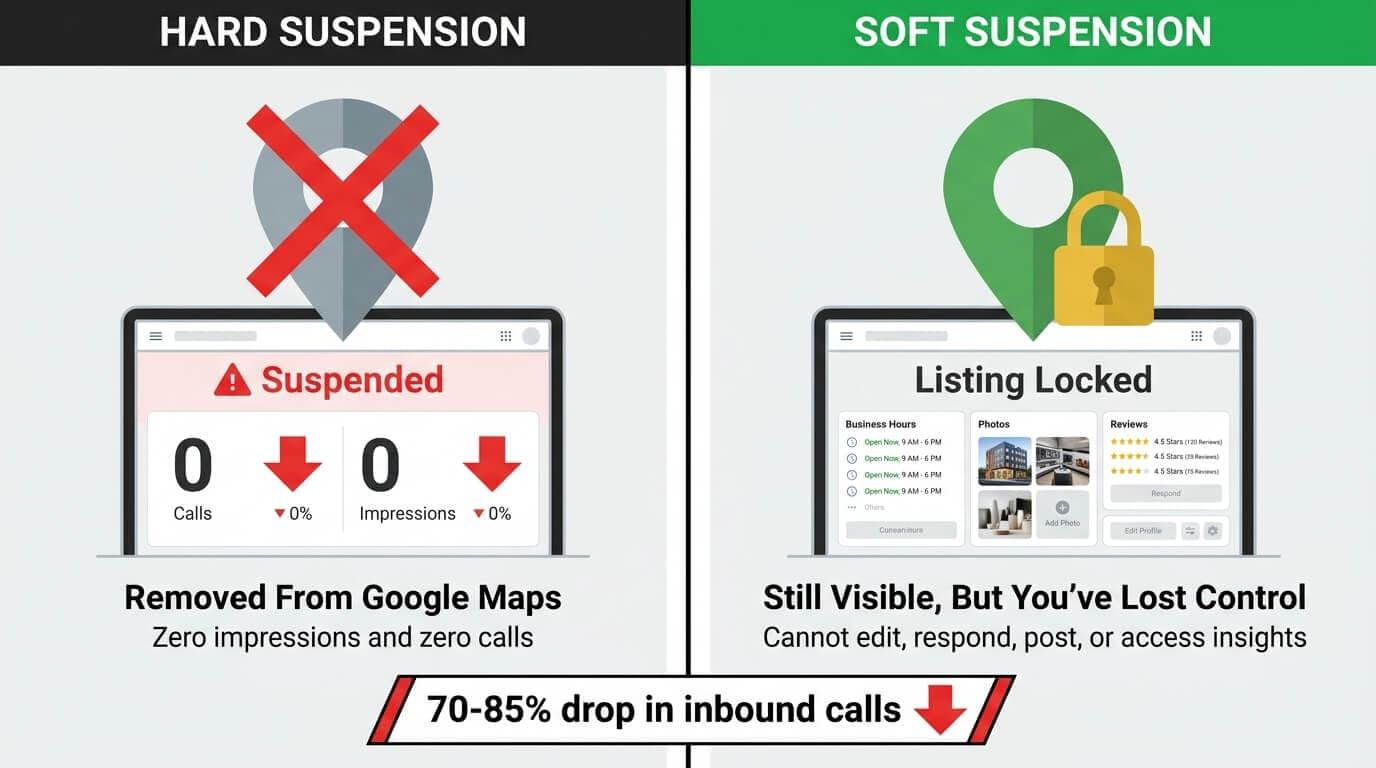
Before you take any action, you need to know exactly what you’re dealing with. The wrong move at the wrong stage can make recovery harder or waste one of your two attempts. Here’s how the two types differ.
A hard suspension means your Google Business Profile is completely removed from Google Search and Google Maps, making your business invisible to potential customers on these platforms. A soft suspension means your business listing may still appear in search results, but you cannot manage it normally—your management capabilities are restricted, even though the profile is still visible in listings.
Hard Suspension: Removed From Google Maps
A hard suspension pulls your profile from Google Maps and Search entirely. This means your business listing is removed from both Google Maps and search results, making it invisible to potential customers. Your listing simply doesn’t appear, meaning customers can’t find you, call you, or get directions to you on Google.
What you’ll see on your end:
- A suspension notification inside your GBP dashboard
- Profile status showing as “suspended”
- Zero impressions and zero calls from Maps
The revenue drop is immediate. Businesses hit with either type typically report a 70-85% drop in inbound calls almost overnight. Given that 24% of GBP interactions are phone calls and 88% of local searchers call within 24 hours, the damage compounds fast.
The longer the profile stays down, the more ground you lose to competitors who are still visible. That urgency is exactly why having someone who knows the appeal process manage this for you changes the outcome.
Soft Suspension: Still Visible, But You’ve Lost Control
A soft suspension is the trickier of the two. Your listing still appears on Maps. Customers can still see your hours, photos, and reviews. From the outside, nothing looks wrong. A soft suspension means your Google Business Profile may still appear in search results and on Google Maps, but you cannot manage it normally—your management capabilities are limited, unlike a hard suspension where the profile is completely removed.
The problem is entirely on your end. Once a soft suspension hits, you lose the ability to:
- Edit your business information
- Respond to reviews
- Post updates or offers
- Access profile insights or performance data
Many business owners miss a soft suspension entirely because the profile looks live to the public. If you log in and cannot make changes, that is your signal. Identifying which type you have is the non-negotiable first step because the fix for each is completely different.
If you’re unsure which type you have, that alone is a reason to bring in a professional who can diagnose it in minutes rather than hours.
Why Google Suspended Your Profile (The Real Reasons in 2026)
Understanding what triggered your suspension is not optional. It is the foundation of your entire appeal strategy. Even legitimate businesses can be suspended due to potential violations, trust issues, or the inability to verify business legitimacy or location.
Suspensions do not always happen because you broke the rules, but when a violation is involved, the cause almost always traces back to one of the following.
In complex cases—such as those involving multiple previous issues, unclear documentation, or high-risk industries—a more detailed and strategic approach may be necessary to resolve the suspension.
The Top Guideline Violations Google Flags
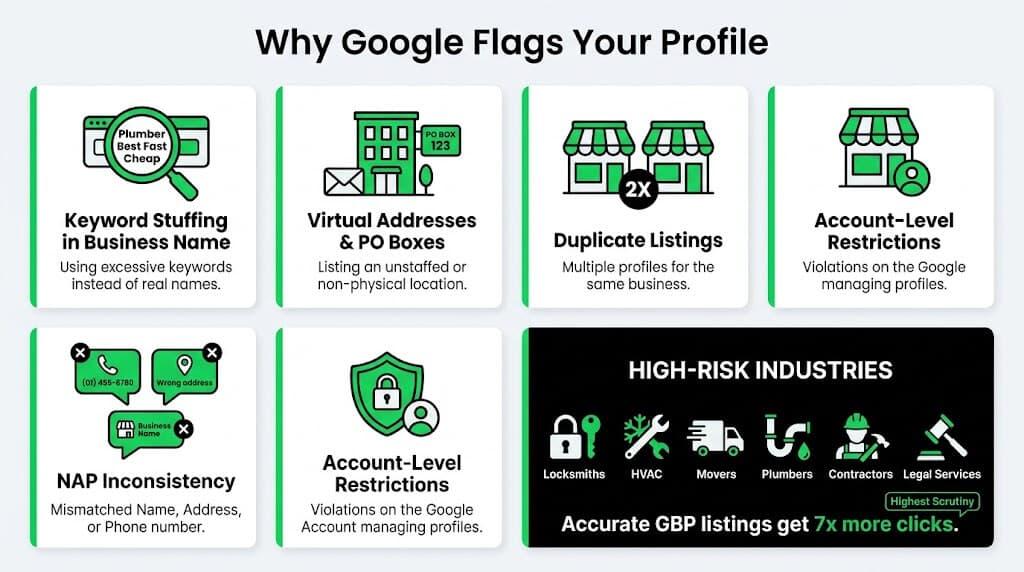
Google’s automated systems are built to catch patterns, and certain actions trigger a flag almost every time. Working through hundreds of suspension cases, these are the recurring causes that keep popping up.
- Keyword stuffing in your business name: Listing your business as “Joe’s Locksmith 24/7 Emergency Cheap” instead of your actual registered name is a direct violation. Your GBP name must match your signage, license, and tax filing exactly.
- Virtual addresses and PO boxes: Most business types must list a real, staffed location. In 2026, Google cross-references addresses against USPS data, Street View, and business license databases. A Regus suite you never use will get caught.
- Duplicate listings: Even old, abandoned profiles for the same business can flag your active listing as spam. If a previous profile sits in Google’s index, it surfaces as a conflict.
- NAP inconsistency across directories: Mismatched Name, Address, and Phone Number across the web raises spam signals. Accurate GBP listings get 7x more clicks, which signals how heavily Google weights consistency.
- Account-level restrictions: If the Google account managing your profile gets flagged, every profile under that account goes down, not just one listing. One agency restriction can simultaneously pull every client listing attached to it.
That last point is the one most business owners never see coming, and it’s exactly why the audit step matters before you file anything.
It’s also the one most likely to go undiagnosed without someone who knows what to look for. The difference between finding it in an hour versus a week often comes down to whether you have experienced eyes on the account.
“One of the biggest risks of managing multiple accounts across different clients is the fact that the agency’s account could get flagged and cause issues across all clients. This is why it’s so important to use a dedicated account solely for managing client accounts. To be fair, it’s rare that this takes place but it is worth noting when allowing an agency to take over your account. You are more likely to get flagged due to an address or business name than anything else nowadays. “
Nathan Smith, Founder of SEOptimize
Algorithmic Sweeps and False Positives
Not every suspension means you did something wrong. The April 2026 mass suspension wave is proof of that. Let’s talk about what happened and why it matters for your appeal strategy.
- Google pushed three algorithm updates in four weeks between February and April 2026, pushing local search volatility to 9.5 out of 10, the highest recorded reading of the year.
- Google’s AI moderation flagged profiles based on pattern similarities to known spam, and thousands of clean businesses matched those patterns. Many businesses, including real businesses, were affected by these algorithmic sweeps.
- There was no specific violation to fix. Profiles that matched flagged patterns were pulled regardless of their actual compliance history.
The practical implication here: If there’s no violation to correct, your appeal needs to be built around proof of legitimacy, not an explanation of what you changed.
It’s also where professional guidance on framing and evidence selection can be the deciding factor between reinstatement and a denial. Getting this wrong the first time costs you one of two attempts you can’t afford to lose.
High-Risk Categories Facing Extra Scrutiny
Some industries are under a tighter lens from the start. This isn’t personal. It’s a direct result of historical spam abuse in those verticals. The categories Google watches most closely include:
- Locksmiths
- HVAC companies
- Movers and relocation services
- Plumbers and general contractors
- Garage door and home services
- Legal services
- Service businesses
Google scrutinizes these categories heavily because spam operations have historically targeted them. These high-risk industries, including legal services and service businesses, are more likely to face thorough reviews and suspensions. In many cases, a single industry-wide enforcement sweep pulls legitimate operators alongside bad actors.
If your business falls into any of these verticals, your profile needs stricter hygiene, better documentation storage, and proactive compliance review, not reactive scrambling after the fact. At SEOptimize, ongoing compliance monitoring for high-risk category clients is built into every local SEO engagement from day one.
How to Appeal a Google Business Profile Suspension
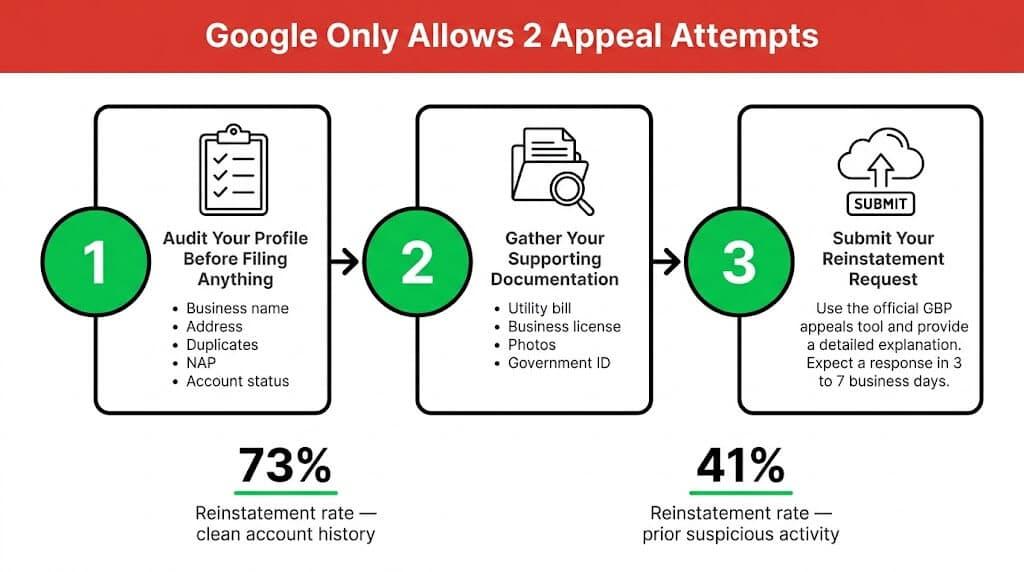
A GBP suspension appeal is a structured, evidence-based process, not a complaint form. More importantly, Google only allows two appeal attempts. If both are denied, the profile is permanently suspended. That reality shapes everything below.
Step 1: Audit Your Profile Before Filing Anything
Filing before fixing the root cause is the fastest way to waste one of your two attempts. Google’s review team looks at the current state of your profile, not just your explanation. Before you open the appeals tool, use the business profile dashboard to carefully review and correct your listing details and business location. Go through each of the following and correct them:
- Business name: Use your exact legal registered name only. Remove all added keywords, location terms, and descriptors.
- Address: Remove virtual offices or PO boxes. If you are a service-area business that does not serve customers at a physical location, hide your address in your profile settings. Ensure your business location is accurate and consistent with your website and other listings.
- Duplicate listings: Search your business name and address and identify any orphaned profiles. Merge or remove them before filing.
- NAP consistency: Align your Name, Address, and Phone Number across your website, GBP, and every directory citation. “LLC” vs no “LLC,” different phone formats, these inconsistencies are red flags.
- Account status: Confirm the Google account managing your profile has no independent restrictions. Account-level issues require a separate appeal and must be addressed alongside or before the profile appeal.
- Business profile ID: Locate and verify your business profile ID in the business profile dashboard, as you will need it for your reinstatement appeal.
- Potential violations: Audit your profile for any potential violations of Google’s guidelines, including inaccurate listing details or misrepresentation, and correct them before submitting your appeal.
This audit step is where most DIY appeals fall apart. Business owners fix the obvious surface issue and file, unaware that a deeper account problem is still flagged underneath. A thorough audit before filing isn’t optional, and it’s exactly the kind of work an experienced agency does before a single form is touched.
Step 2: Gather Your Supporting Documentation
Documentation quality separates successful appeals from failed ones. Weak or incomplete evidence is one of the most common reasons appeals stall. Prepare all of the following before you file:
- A utility bill or signed lease agreement confirming your business address, dated within the last 90 days
- A valid business license with your listed name and location matching your GBP exactly
- Storefront photos showing your signage and entrance clearly, or vehicle and equipment photos with visible branding for service area businesses
- A government-issued ID matching the account holder’s name on the profile
Every document needs to be clear, current, and internally consistent. A mismatch between your license and your GBP name is enough to derail a review on its own.
“When you are appealing a suspension, the most important thing to do is act quickly. Submit an appeal with Google Support the day you find it. Mainly, because they are typically extremely slow to respond. But remember, smooth is fast and fast is smooth. Make sure all of your documents are accurate and always provide more than you need to. In other words, you should always have this information on deck as it can happen at any time.”
Nathan Smith, Founder of SEOptimize
Step 3: Submit Your Reinstatement Request
With a corrected profile and a complete documentation package, submit through the official GBP appeals tool. Don’t go through general Google support. It won’t route your case to the right review team.
A few rules that protect your queue position:
- Complete every field in the form with accurate information.
- Include your business profile id in your appeal to help Google verify your specific business account.
- Upload your documentation directly to the submission form.
- Avoid emotional language in your appeal message; keep it factual and concise.
- Do not submit a second appeal while the first is under review. Multiple submissions reset your queue position and extend your wait.
- If Google requests additional information, respond promptly. Delays on your end stall the entire process.
What Actually Moves the Needle on Approval
Not all appeals have the same odds. Understanding the source of the gap helps you build a stronger submission.
- Profiles with a clean account history have a reinstatement rate of around 73%
- Profiles flagged for prior suspicious activity drop to roughly 41%
- That 32-point gap reflects how heavily your account history weighs on the outcome
On timeline: Simple appeals resolve in 3 to 7 business days in 2026. However, complex cases—such as those involving multiple previous issues, high-risk industries, ownership conflicts, or unclear documentation—may take up to 2 weeks or more for Google to review.
For context, contested cases reached 5 to 6 weeks in early 2025. Complex or escalated cases today can still stretch to 3 to 6 weeks.
What you can control: A clean, corrected profile, thorough documentation, and a fast response to any follow-up from Google. That’s the entire playbook.
If managing this process on top of running your business is not realistic, that’s exactly what SEOptimize handles. GBP reinstatement and ongoing compliance are built into our local SEO services.
If Your Appeal Gets Denied: What Comes Next
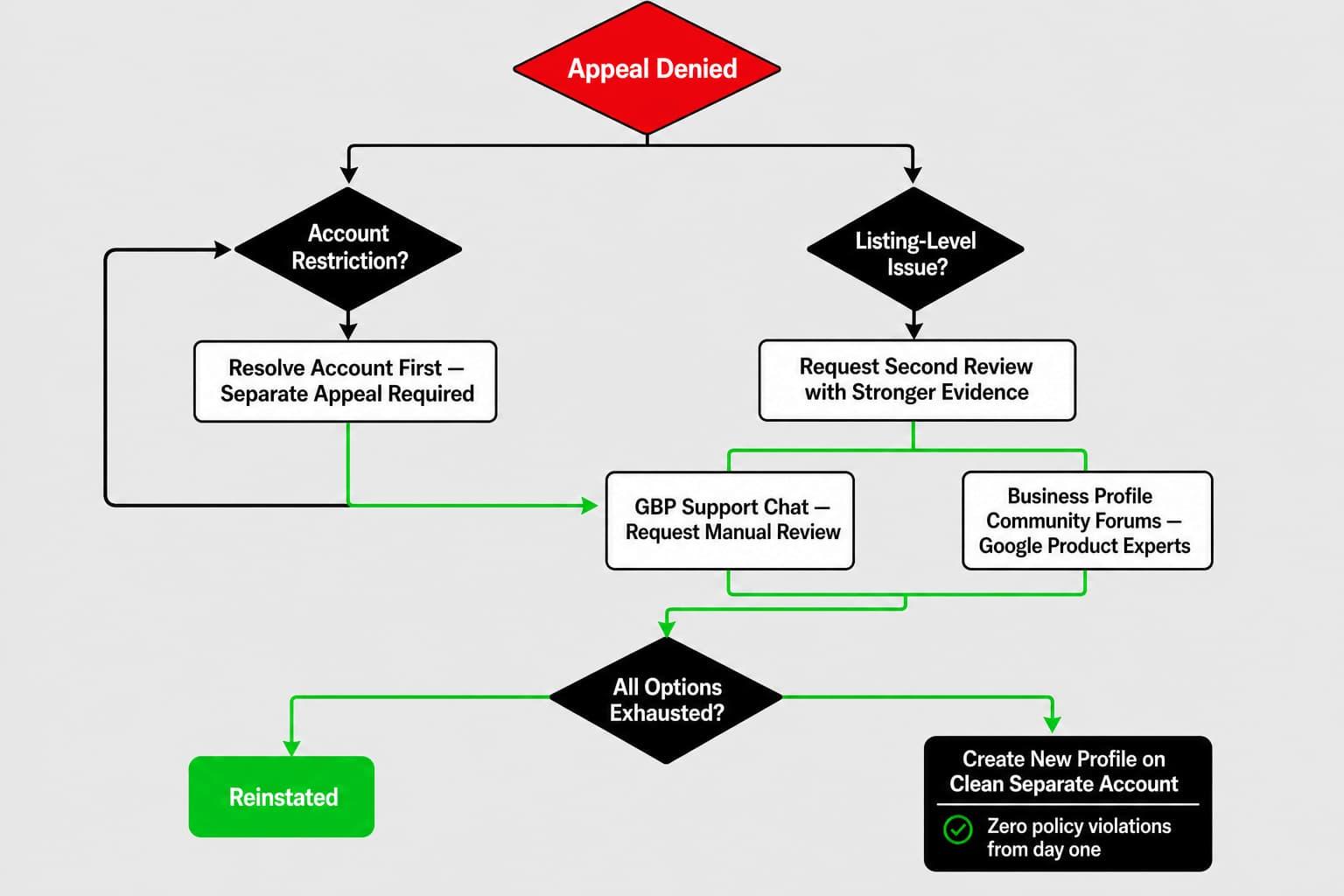
A denied appeal isn’t the end of the road. It’s a signal to regroup, strengthen your evidence, and escalate through the right channels. The same preparation principles from the previous section apply here, but with a sharper focus on what was missing the first time.
Additionally, use this opportunity to review your practices and implement strategies to prevent future suspensions by ensuring ongoing compliance with Google’s guidelines and proactively monitoring your profile to avoid future suspensions.
How to Escalate After a Denial
Start by requesting a second review through the appeals tool. If you have documentation that was not included in your first submission, this is the time to add it. A stronger evidence package changes outcomes. From there, two escalation paths are worth using:
- GBP support chat: A legitimate escalation path. Flag your case directly and request a manual review.
- Business Profile community forums: Google Product Experts monitor these and can surface stuck cases that have stalled in the automated queue.
If the denial stems from an account restriction rather than a listing-level issue, escalating the listing alone will not resolve it. The account must be addressed first. And with only two total appeal attempts allowed, treat each submission as your best possible case.
When Creating a New Profile Makes Sense
Some hard suspension cases reach a point where reinstatement is not realistic. If every escalation path has been exhausted and the account is restricted beyond recovery, starting fresh is the practical option. That new profile must meet all of the following conditions:
- Built on a clean, separate Google account with no Google account restrictions
- Accurate business information with zero policy violations from day one
- No shortcuts, no workarounds
Consider working with a marketing agency that follows Google’s guidelines to help avoid future suspensions and ensure compliance.
This is a clean start under full compliance. It only makes sense after the original appeal process has been genuinely exhausted.
How to Keep Your Profile Safe Going Forward
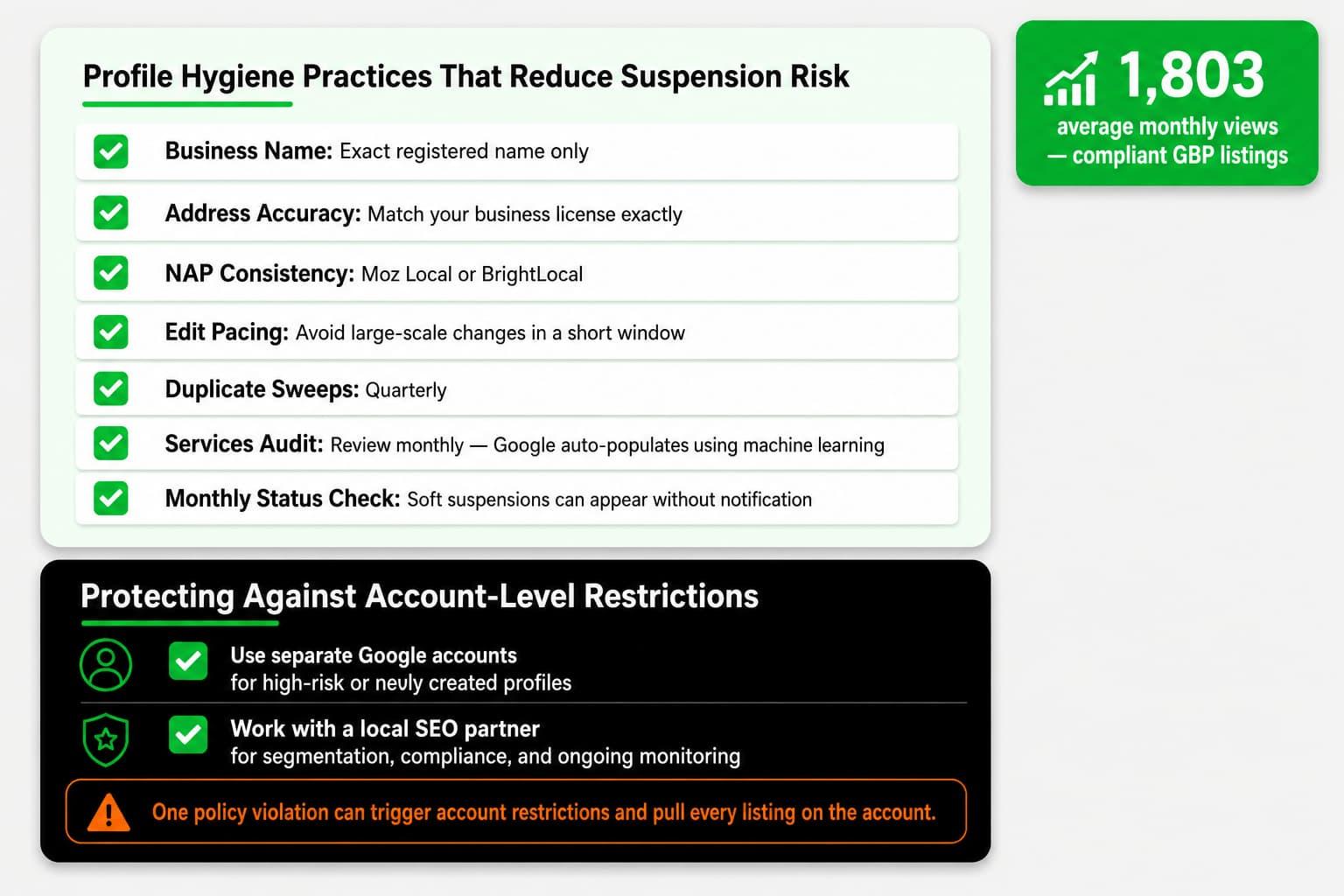
Reinstatement is only half the battle. The businesses that stay reinstated treat profile maintenance as an ongoing habit, not a one-time fix.
Ongoing monitoring is crucial to prevent future suspensions and keep your business visible on Google Search and Maps. Compliant GBP listings average 1,803 monthly views, mostly from discovery searches. The moment maintenance slips, so does that visibility.
Profile Hygiene Practices That Reduce Suspension Risk
The following habits, applied consistently, are what keep profiles off the suspension list. Each one addresses a known trigger.
- Business name: Your exact registered name only. No keywords, no location terms, no descriptors. “Smith Plumbing LLC” is correct. “Smith Plumbing LLC Best Plumber Dallas” is a direct flag.
- Address accuracy: Match your business license exactly. Service-area businesses that do not serve customers at a physical location must hide their address in their profile settings.
- NAP consistency: Identical Name, Address, and Phone Number across every directory, citation, and your website. Tools like Moz Local or BrightLocal can audit this at scale.
- Edit pacing: Avoid making large-scale changes to your profile in a short window. Burst editing triggers algorithmic review flags.
- Duplicate sweeps: Check for and remove duplicate listings quarterly. Old unaddressed profiles are passive suspension risks.
- Services audit: Google now auto-populates GBP services using machine learning. If it adds services you do not offer and a user flags it, your profile can be suspended for misrepresentation. Review this section monthly.
- Monthly status check: Soft suspensions can appear without notification. Catching one early prevents escalation.
Protecting Against Account-Level Restrictions
This is the risk most businesses ignore until it’s too late. Managing multiple GBP listings under one Google account creates a single point of failure, especially when multiple listings for the same business or address are involved, which can be seen as manipulation or spam by Google.
One policy violation on any profile can trigger a google account restriction that pulls every listing attached to that account, impacting all managed profiles and making reinstatement more difficult.
The fix involves two straightforward practices:
- Use separate Google accounts to manage high-risk or newly created profiles, especially when handling multiple listings.
- Work with a local SEO partner to keep accounts properly segmented and monitored.
That structure removes the single point of failure entirely. It’s also the kind of setup that most business owners don’t think to build until after they’ve experienced the catastrophic version of this problem. Setting it up correctly from the start, with professional oversight, is the one move that costs the least and protects the most.
If you’re a local business owner, your Google Business Profile is one of your most valuable assets. It should be treated the same as any marketing objective. Without it you’re invisible and if you’re invisible, you’ve already lost too much. Most local business owners don’t have time to check on things like this routinely. That’s why we do it for them.
Nathan Smith, Founder of SEOptimize
At SEOptimize, profile hygiene and account segmentation are part of every local SEO engagement from day one. You should never have to wonder whether your listing is at risk. We track it so you don’t have to.
Get My Free Organic Traffic Audit
Final Thoughts
A suspended Google Business Profile is serious, but it does not have to be permanent. In many cases, suspended profiles can be recovered by identifying the root issue, correcting the violations, and submitting a proper reinstatement request. Know your suspension type, fix the problem before filing, document everything, and send one clean appeal.
The reinstatement process works best when you approach it strategically and with complete documentation. Once your profile is restored, consistent profile hygiene is what helps keep it that way.
At SEOptimize, we help local businesses recover from GBP suspensions and protect their local rankings in the long term. We don’t chase rankings; we deliver customers. If you want experienced hands on your reinstatement, your compliance, and your ongoing local visibility, our local SEO services are built exactly for that.
Frequently Asked Questions About GBP Suspensions
Still have questions? Below are some of the ones local business owners ask most when navigating a suspension.
Why was my Business Profile suspended even though I followed the rules?
Your Google Business Profile can be suspended even when you followed the rules because Google’s automated systems flag profiles based on pattern recognition, not just confirmed violations. In fact, even legitimate businesses and many businesses can be suspended due to these automated reviews, not just those with malicious intent. The April 2026 mass suspension wave caught thousands of legitimate businesses in algorithmic sweeps designed to target spam. If your profile resembled a flagged pattern, it was pulled regardless of your actual compliance history.
How long does a Google Business Profile suspension last?
A Google Business Profile suspension remains in place until your appeal is reviewed and approved. In 2026, straightforward appeals with a clean account history are resolving in roughly 3 to 7 business days. Cases involving prior flags, incomplete documentation, or account-level issues can stretch to 3 to 6 weeks. Submitting multiple appeals resets your queue position, making the wait longer, not shorter.
What is the difference between a suspended profile and a suspended account?
A suspended business listing affects a single business location, meaning only that specific profile is impacted. In contrast, an account-level suspension can impact multiple listings managed under the same Google account, including cases where there are multiple listings for different locations or, if improperly configured, for the same address. For multi-location businesses and agencies, this distinction is critical. Appealing individual listings will not resolve an account-level restriction; the account itself must be addressed first through a separate appeal before any business listing reinstatement can move forward.
How many times can I appeal a Google Business Profile suspension?
You can appeal a Google Business Profile suspension twice. Google’s 2023 policy update made permanent suspension the outcome after two failed attempts, with no further recourse. To avoid exhausting your appeals, ensure you follow Google’s guidelines closely and provide accurate information when correcting your profile. Fix the root violation, gather complete documentation, and submit a thorough appeal. Do not file until you are fully ready.
Can I create a new Google Business Profile if my appeal is denied?
You can create a new profile after a denial, but only under the right conditions. It must be built on a clean, separate Google account with accurate business information and zero policy violations from day one. Before proceeding, ensure there are no Google account restrictions on the new account, as these can impact multiple Business Profiles and affect the reinstatement process. If the denial stemmed from an account-level restriction rather than a listing-level issue, that restriction must be resolved first. Shortcuts on the new profile risk immediate suspension of that listing as well. Working with a marketing agency that follows Google’s guidelines can help you avoid future suspensions and account issues.